Sky Climb Guide

In Sky Climb your character bounces automatically every time it lands on a platform. You only steer left and right, riding an endless column of platforms as high as you can go. The controls are simple, but the higher you climb, the narrower and farther apart the platforms get, and hazards start flying in, so a few tricks help a lot.
Gameplay video

A YouTube Short of real Sky Climb gameplay. Tap the thumbnail to play it right here on this page. Watching the flow first and then reading the controls and tips below is the quickest way to get the hang of it.
Controls
| Device | How to play |
|---|---|
| Keyboard | Left/Right arrow keys or A/D to move |
| Mouse | Move the mouse left and right and the character follows it. |
| Phone / tablet | Touch the screen and drag left or right |
There is no jump button. You bounce automatically on contact, so all you decide is which platform to land on. The screen edges are walls (you do not wrap around to the other side), so line up early when you aim for a platform near the edge.
Scoring
Your score is the height (m) you reach. The camera only scrolls upward, so height you have gained is never lost, and your record only rises when you reach a new high point. A normal platform launches you about 22 m; a spring launches you about 54 m.
Screenshots
The background and the platforms change with height.
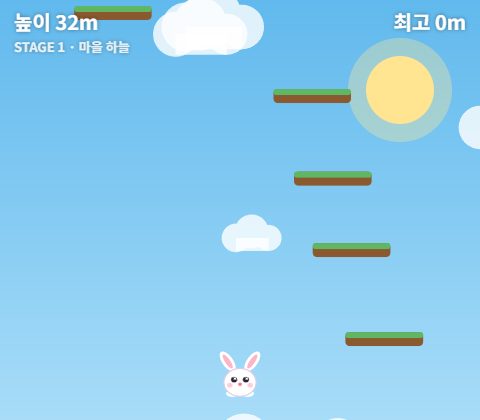
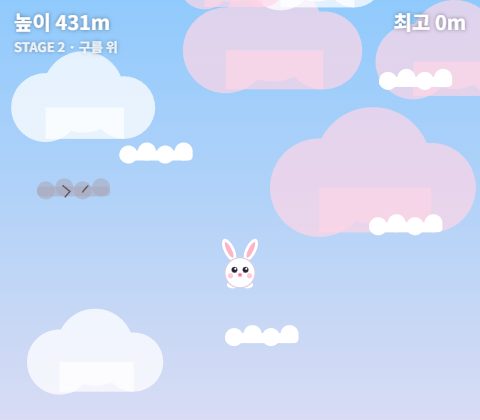
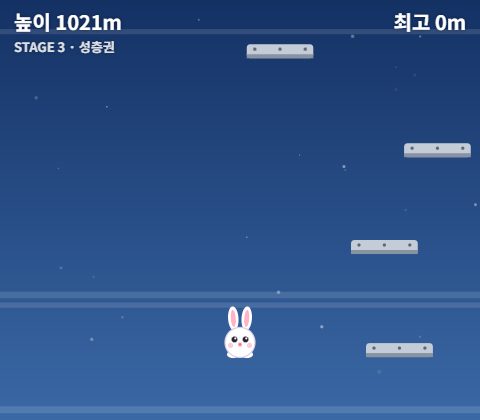
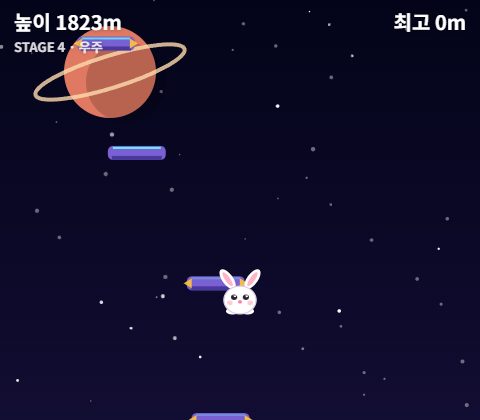
Stages
| Stage | Starts at | Background | What is new |
|---|---|---|---|
| 1 | 0 m | Town Sky | Grassy normal platforms |
| 2 | 400 m | Above the Clouds | Cloud platforms, hazards flying in from the sides |
| 3 | 1,000 m | Stratosphere | Metal platforms |
| 4 | 1,800 m | Space | Space platforms, hazards move diagonally downward |
| 5 | 2,800 m | Black Hole | Glowing black rock platforms, spinning space junk being pulled in |
| 6 | 4,000 m | Wormhole | Glowing energy platforms, plasma orbs that bob up and down |
| 7 | 5,400 m | 4D Library | Bookshelf platforms lined with books, flapping flying books |
Platforms and items
- Normal platform: the basic platform that bounces you up.
- Moving platform: appears from about 200 m. It slides left and right, so read its motion and time your landing.
- Breaking platform: mixed in from about 150 m. It crumbles when you land and you fall straight through, so avoid platforms with a cracked pattern.
- Spring: sits on some platforms. Land right on it and you fly more than twice as high as a normal bounce, a great way to gain a lot of height.
Tips for climbing higher
1. Pick the next platform while you are rising
Looking for the next platform after you land is too late. Choose it while you are still going up and start drifting toward it on the way.
2. Avoid cracked platforms
Breaking platforms are almost the same color as normal ones but have a crack pattern. Landing on one can end your run instantly, so make a habit of checking the platform before you land.
3. Hit springs dead center
A spring only triggers if you land right on top of it. Make small corrections so you fall onto the spring, not the end of the platform.
4. Read the height of incoming hazards
From Above the Clouds (400 m) birds, thunderclouds, meteors, space junk, plasma orbs and flying books fly in from the side. From the Wormhole on they bob up and down, so watch their height closely. One touch ends the game, so watch their direction and height, then adjust your climb or step one platform aside. They come more often the higher you go.
5. Do not overcorrect
Up high, platforms get narrower and gaps get wider. Big movements make you overshoot, so move in small steps and save big moves for when you need them.
Game over
- You fall off the bottom of the screen
- You touch a flying hazard
- You come all the way back down to the ground after starting
The gap between platforms is always built to be reachable with a normal bounce (the biggest gap is lower than your jump height), so as long as you do not make a mistake, you can keep climbing.
Characters
The six characters look different but play exactly the same.
- Hoppy - a bunny with floppy ears
- Peep - a flapping little chick
- Blip - an alien with glowing antennae
- Whiskers - an orange cat with a swishing tail
- Waddles - a wobbly baby penguin that flaps its flippers
- Puffy - a hamster whose cheeks puff up as it falls
Leaderboard
When the game ends you can enter a nickname to save your height, and the top 20 are shown on the leaderboard. Your personal best is saved in your browser. The server compares your real play time with the height you reached and rejects anything that is not possible.
Other guides: Jump Runner · Fish Dodge · Neon Shooter · Orbit · Making-of notes